

Frequently Asked Questions about art
Vector, Raster, DPI, LPI, Trapping.... What do all these terms mean?
Confused by all the technical mumbo-jumbo? Here’s a quick guide to understanding the terms.
- WHAT IS VECTOR ART?
- WHY DOES MY ART HAVE TO BE IN VECTOR FORMAT?
- CAN A BITMAP IMAGE BE CONVERTED TO VECTOR ART?
- WHY DO I HAVE TO “CONVERT FONTS TO OUTLINES” AND HOW DO I DO THAT?
- WHAT DO DPI, LPI AND PPI MEAN?
- WHAT IF MY ART DOESN’T MEET YOUR SPECIFICATIONS?
- I DON’T HAVE AN ILLUSTRATION PROGRAM, HOW DO I CREATE MY ART?
- WHY CAN’T I SUBMIT MICROSOFT WORD OR PUBLISHER FILES?
WHAT IS VECTOR ART?
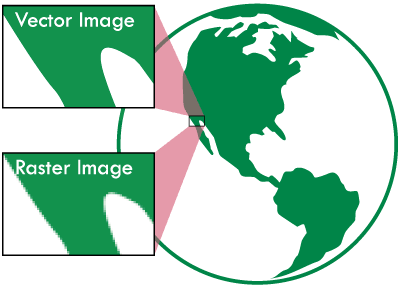
For printing bags, we require vector art. The reasons are explained below.
Vector images are shapes and lines drawn in an illustration program (like Adobe Illustrator or CorelDraw) that have mathematical dimensions. This allows unlimited scalability without compromising the image quality. Images have smooth edges at all sizes, and file sizes much smaller than bitmap (raster) images. Common vector formats are PDF, Adobe Illustrator - AI, EPS, and Corel Draw (CDR).
The tricky part is that while vector files are saved in those formats, bitmap files can also be saved in those formats. So opening a JPG image in Illustrator and saving as AI or EPS or PDF, does not change the image to vector.
Bitmap images are made up of a series of individually defined pixels and have a fixed resolution. A 1” x 1” bitmap, at 300dpi, is 300 pixels wide and 300 high. Bitmap images CAN'T be made larger without losing quality. For printing, the higher the resolution of bitmap files, the better the image quality. Common bitmap formats are TIFF, JPG, GIF, PNG, BMP.
WHY DOES MY ART HAVE TO BE IN VECTOR FORMAT?
Vector art provides much cleaner and smoother lines and edges to the art. Half-toning on plastic bags is printed at no smaller than 35 lpi, which can result in jagged or uneven edges if using a bitmapped image, especially if there is smoothing (anti-aliasing is the fancy term) at the edges of the art or text.
CAN A BITMAP IMAGE BE CONVERTED TO VECTOR ART?
Yes, but not always easily. Depending on the complexity of the image, converting bitmaps to vector art can be simple or very time consuming. Many times, art can be electronically "traced" in a vector art program. Tracing doesn't always work very well with small text and small details can get lost. Converting more complex, or multiple color bitmaps to vector art sometimes requires rebuilding the art from scratch – matching fonts, and redrawing lines. Placing a bitmap into an illustration program and saving as an EPS or PDF does NOT convert the file to vector.
WHY DO I HAVE TO “CONVERT FONTS TO OUTLINES” AND HOW DO I DO THAT?
Fonts are collections of the letters defined in a specific typeface. Each letter has a description of the shape, and how that shape should be displayed. Fonts can only be displayed on computers where the font file is installed. If the computer opening the document doesn’t have the proper font installed, programs usually substitute another font. Obviously, this can cause problems. Converting fonts to plain outlines disconnects the font descriptions from the letters, and prevents the shape from changing. Once the type is converted to outlines, it can no longer be edited as type.
To convert type to outlines, an illustration program like Adobe Illustrator or CorelDraw is required. Adobe InDesign is also capable of converting type to outlines. In Illustrator, chose “create outlines” from the Type menu. In CorelDraw, select “Convert to Curves” from the Arrange menu. In InDesign, chose “create outlines” from the Type menu.
PDF files use embedded fonts, and will print and display correctly, but if these files need to be edited, the computer opening the file must have the correct font, or it won’t display properly. It is best to convert fonts to outlines before creating a PDF file.
WHAT DO DPI, LPI AND PPI MEAN?
Both digital bitmap images and printed images are made up of a series of dots.
- DPI – Dots Per Inch –the resolution of a printed image, how many dots of ink printed per inch.
- PPI – Pixels Per Inch – refers to the number of pixels per inch (vertically and horizontally) in a digital image
- LPI – Lines Per Inch – refers to the lines of dots in a halftone or screen - the higher the number, the smaller the dots.
Printer DPI is generally a higher number than the image PPI, and the PPI is a higher number than the LPI. For most commercial printing applications, digital images need to be a minimum of 300 PPI. If there are image areas that will be halftoned (not a solid color), the LPI indicates the number of lines of dots per inch. For many print applications, LPI is approximately half the number of the PPI. For the process that we use for plastic bags, 35 is the maximum LPI that prints well.
WHAT IF MY ART DOESN’T MEET YOUR SPECIFICATIONS?
After we receive your art, we inspect it to make sure it will print well. If we see any issues with the art, you will be contacted with information about the problem. Common issues involve embedded fonts, incorrect trapping, thin outlines, too much halftoning, and low resolution bitmaps. If you are unable to correct the issues, an art quote will be provided.
I DON’T HAVE AN ILLUSTRATION PROGRAM, HOW DO I CREATE MY ART?
If unable to create your art in an illustration program, you will probably need to hire a graphic designer to do the work for you. If you would like us to prepare the art, let us know and we will give you a quote.
WHY CAN’T I SUBMIT MICROSOFT WORD OR PUBLISHER FILES?
These programs, while powerful, are not designed for creating artwork for commercial presses. The best way to submit art made in these programs is to save them as PDF files.